Version 10.0.0 of Topo GPS, the most versatile outdoor navigation app, is now available. This major update introduces several new features specifically designed for iOS 18, making it the ultimate outdoor navigation tool for your iPhone and Apple Watch.
New Control Center Widgets
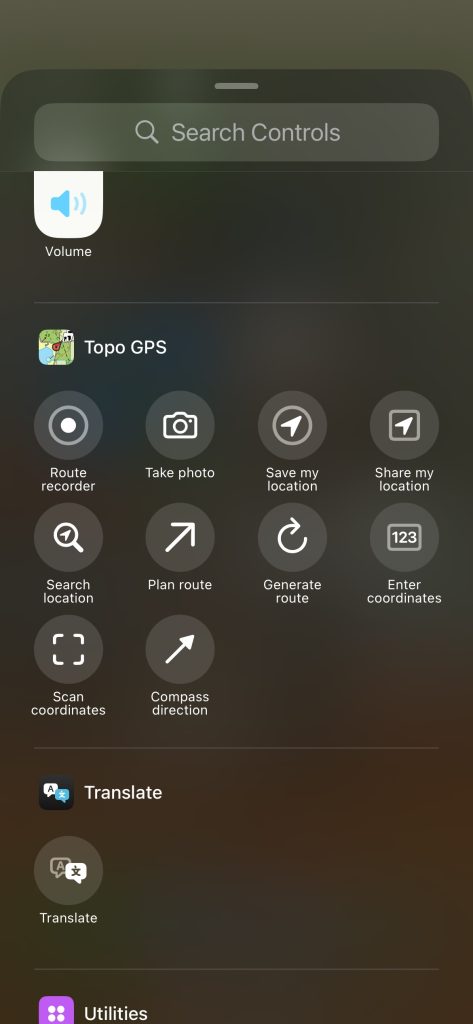
You can now add Topo GPS control buttons directly to your iOS Control Center. This makes the app’s most essential functions instantly accessible from anywhere on your iPhone. To add these buttons, simply long-press on your Control Center background and tap “Add a Control.”
Available Control Center shortcuts include:
- Route Recording: A simple toggle to start or stop tracking your route.
- Save Waypoint: Instantly save your current location as a waypoint in Topo GPS.
- Share Location: Share your whereabouts with others, automatically including a map, address, and location link.
- Camera: Take photos that are instantly added to a waypoint on your map and saved to your Apple Photos app.
- Route Planning: Quickly plan or generate a new route.
- Coordinates: Directly enter or scan coordinates.
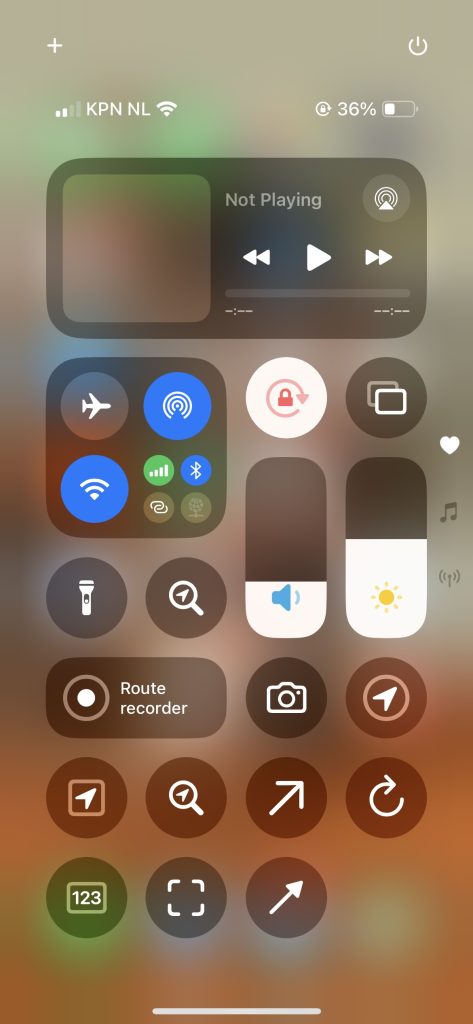
Below is an example of a customized Control Center screen featuring the new Topo GPS widgets.
Hands-Free Navigation with Siri
Version 10.0.0 brings comprehensive voice command support via Siri. You can now control the app hands-free, which is incredibly useful while hiking or cycling. For example, simply say, “Hey Siri, record a route with Topo GPS,” and when you are finished, “Hey Siri, stop recording route with Topo GPS.”
Here is a full list of supported Siri commands:
- “Hey Siri, record a route with Topo GPS” — Starts a new route recording.
- “Hey Siri, stop recording route with Topo GPS” — Ends your current route recording.
- “Hey Siri, save my location with Topo GPS” — Saves your current spot as a waypoint.
- “Hey Siri, share my location using Topo GPS” — Automatically generates a map, address, and link to share via iMessage, WhatsApp, or other apps.
- “Hey Siri, plan a route with Topo GPS” — Siri will ask for your destination and calculate a route from your current location.
- “Hey Siri, search a location with Topo GPS” — Siri will ask for a place name or address and display its waypoint on the map.
- “Hey Siri, take a photo with Topo GPS” — Opens the camera. Photos taken are added to the map and saved to your device.
- “Hey Siri, enter coordinates with Topo GPS” — Opens the coordinate entry screen.
- “Hey Siri, scan coordinates with Topo GPS” — Opens the coordinates scanner.
Apple Shortcuts Integration
Finally, Topo GPS now fully integrates with the Apple Shortcuts app. By opening the Shortcuts app, you can find a wide variety of Topo GPS actions. You can add these as custom icons to your home screen or combine them with other apps to create powerful, automated workflows.


